Title here
Summary here


A company’s fiscal year represents a 12-month period that a business uses to structure its financial reporting and accounting cycles. Unlike the calendar year, which follows the Gregorian dates from January to December, a fiscal year is often tailored to the company’s operational cycle. For instance, a retail business might end its fiscal year on the last day of January to align with its peak shopping season and annual planning cycle. This allows for a more accurate reflection of the company’s financial performance over a period that best captures its revenue patterns and business activities.
The ability to add, edit, and manage company fiscal years is a highly beneficial for several reasons:
Accurate Financial Reporting: It ensures that all transactions and financial activities are recorded and reported within the context of the correct fiscal year, providing a clear and precise picture of the company’s financial health over time.
Regulatory Compliance: Different companies may have different fiscal years based on regulatory requirements or industry standards. The software’s flexibility allows businesses to adhere to these specific needs without compromising on reporting accuracy.
Operational Efficiency: Companies can tailor their fiscal years to align with key operational milestones, such as the launch of new products, seasonal sales peaks, or strategic planning periods. This helps in making more informed decisions based on financial data that is most relevant to their business operations.
Historical Analysis and Forecasting: With the ability to view all transactions and work done within a specific fiscal year, businesses can conduct thorough historical analyses and make projections for future years. This historical context is invaluable for strategic planning and identifying trends over time.
Tax Planning and Compliance: A company’s fiscal year often determines its tax reporting cycle. By managing fiscal years within the software, businesses can better plan their tax strategies and ensure compliance with tax regulations.
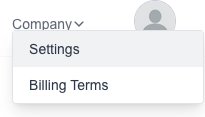
Goto the Settings page which is under the “Company” menu:
Click on the “Financial Years” menu on the left.
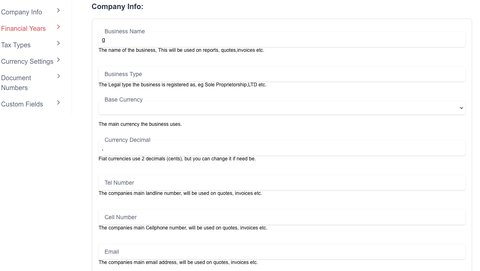
Click on the “New Year” button:

The new year form will appear for you to fill in the desired information:
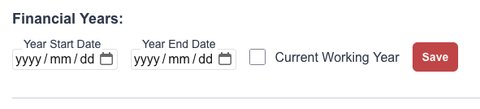
Click on the “Save” button to save the year.
Goto the Settings page which is under the “Company” menu:
Click on the “Financial Years” menu on the left.
You will see a list of all your “Financial Years”.
Simply change the value to your needs and then click on the “Save” button to save them.

If you need to delete a year, click on the “delete” (trash Icon) next to the year.
